Here is a tutorial on converting Wave files to mp3 or AAC (Mpeg4-style
Advanced Audio Codec)
Original audio clip: 2hard.wav (2.4 MB), courtesy of Matt Smith
After loading this
Wave file into Audacity, it may look like this: (click image to
enlarge)
Converting to
other formats:
Simply select: File >
Export...
Entering
optional Metadata:
Before you get to choose an export format and its specific parameters
(such as quality or bitrate and frequency range), you have an
opportunity to create a collection of tags and information that might
be included with some exports in a header. This is called Metadata:
Suggested use:
You might want to at least put your name in there (if you authored the
audio's clip) and the name of the track. You can also save it as a
template for future uses, so that you may not have to re-enter the same
info each time, and change just the track or album title or comments.
Selecting the
format
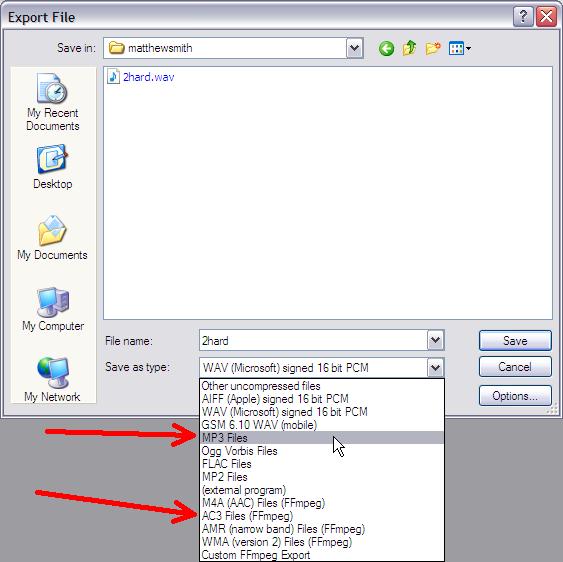
After you click on 'OK' on the metadata dialog, you'll get to choose
the output format. The first set of formats are internal to
Audacity but in some cases may require an additional library or similar
resource to assist in the conversion. For example, the LAME mp3
converter is needed to save to mp3 format.
Note that if you don't have the required libraries, it will tell you so
when you attempt to export to it. Furthermore, it will suggest where
you can download or obtain the missing pice(s).
The bottom set of formats use external programs, such as ffmpeg. Once
again, you will be assisted by Audacity in your quest to find the
missing pieces.
Example
(1) - Saving to mp3
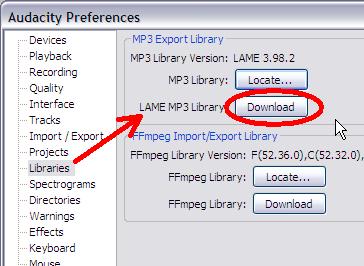
If you don't have the LAME mp3 installed yet, you can get it through
the Edit > Preferences menu in the Libraries category:
you will likely be directed to the LAME mp3 library download for
audacity, hosted by Buanzo at http://lame.buanzo.com.ar
:
If you like this free service offered by Buanzo, you may want to donate
a symbolic dollar or two in support of hosting expenses :-)
Downl;oad and install the LAME library for Audacity. Install it, and
you'll be able to restart Audacity and make use of the mp3 exporter now.
You will want to select MP3 FIles as the format, and click the
'Options' button to set the desired bitrate, quality, speed and channel
mode.
Here's an example of the prior wave file, exported to mp3: 2hard.mp3
The new size is just 263 kB, just about one tenth of the original Wave.
This is much easier to send be email atachments, for example, or to
load to your MP3 player or iPod to listen to.
Example (2) -
Saving to AAC
Here's another exmaple: Try saving to AAC format, using the external
ffmpeg application.
Again, you'll need to go to the Libraries in Preferences.
Select the Edit menu and click on Preferences.
Or use Ctrl+P
Click the Download button in the Ffmpeg category: (lower half)
Find your OS version and follow the instructions to get the download to
install the ffmpeg for Audacity.
When you're ready to
try that export format again, you'll see an option in the Options
button to set the desired quality. The minimum value of 10 gives very
small file sizes, but at the cost of low quality: reduced use of low
bass or high frequencies. On the other end of the quality scale,
500 gives superior quality, but files which are larger. Still, they'll
be smaller than the original Wave file.
Here are two examples, exported at lowest quality (10) and at highest
quality (500):
A fun companion for your
digital
photo image editor!
powered
by Project
Dogwaffle
Can't
afford it on your own?
Fast
3D sketching, colormap, bumpmap and displacement map painting and
digital & sculpting: Curvy 3D
the fun & intuitive way to
sculpt!
...it's not modeling, it's better: It's
liberal sculpting!
Great for Fantasy Art, Concept Art & 3D Design, making 3D props, ...
Special discount coupons available for users of Project Dogwaffle! (ask
us)
from
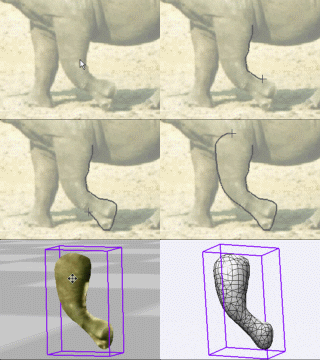
2D to 3D in just seconds! Just trace an
outline and see it automagically
turn into
fully textured 3D shapes for Second Life, Google Sketchup / Google
Earth, Direct X & Games, Wavefront OBJ and other popular 3D file
formats! Archipelis
Designer
rapid
3D model creation and prototyping from mere images - for 3D content
creation, games, IM Avatars, SL models, 3D illustration in Photoshop(R)
and more
New!
now also for Mac!
Finally! 3D for everyone:
Carrara
(boxed) free shipping for
orders $50 and up! (US only)
Hurry before
they're gone - this is a limited inventory blowout sale

 Exporting to MP3 or AAC