

DogLua scripted filter
example:
Flag of Gambiafirst steps in gluas programming with Lua scripts for DogLua
LUA scripts
| As you can see on Wikipedia's
Flag of Gambia, this is another relatively easy flag to program. There are three horizontal color bands, red on top, blue in the middle, and green below, but that's not all. There are also two small white bands separating these colors. The middle blue band is thinner, as it makes room to accomodate for the two white separator bands. If you add the height of the two white separators to the blue middle, it adds up to the same height as the bottom green band or the top red band. In other words, the red is one third of the height. The green is also one third. And the middle blue and two whites all together make the remaining third. So, we'll probably want to first do the top and bottom bands, these are easy, and similar to the french flag's code except that the lines run left to right instead of top to bottom. Now, one more thing: which type of red, green and blue is it? Clearly it's not a pure saturated red in the examples I've seen. You can of course use many tools to find the RGB values of the coloor, including Dogwaffle itself. You can for example use the color picker (turkey baster) to pick a color from the loaded flag image and it becomes the primary color. You can then read the red, green and blue elements of that color. Or, if you like to use Irfanview, here's a tip: click a color, i.e. pick anywhere in the image that's been loaded in irfanview (for example after a screen capture from the website). The you can see the hexadecimal values of the picked pixel in the top window bar.  For example, if you pick the white bands, you'll see (#FFFFFF), which of course means FF red, green and blue each, and that's 255 decimal, so, fully saturated white. For red, as shown above, you'll probably find CE1126. Here are the valued for the top red, the middle blue and the bottom green band: red:
CE1126 - R:CE G:11 B:26
blue: 0C1C8C - R:0C G:1C B:8C green: 3A7728 - R:3A G:77 B:28 For Lua, we need to convert these colors to a normalized real value, mapping the range from 0 to 255 to the numbers 0.0 and 1.0 respectively. So let's convert the above hex values to decimal equivalents: R: CE = 12*16 + 14
= 206
G: 11 = 1*16 + 1 = 17 B: 26 = 2*16 + 6 = 38 So we find the following for the top red band: R:206
G:17 B:38
Likewise for the middle blue and botom green band we find the following: R:12
G:28 B:140
and R:58
G:119 B:40
Now then, we could further convert them to floating point numbers, but we can just as well let the Lua interpreter do that for us, by expressing the conversion in Lua. For example, by dividing the numbers by 255.0 Ok, let's write some Lua code. First, let's declare the variables we'll use: local x, y --
looping variables in X (horizontal) or Y (vertical) directions
Now then, let's do the top loop, for the top band in red: If zero in the vertical axis is the top (I think it is, and if not we'll soon see the wrong colors in the wrong places), let's have a loop that goes from the top down 1/3 of the height: for y = 0, (height - 1)/3 do
Remember, gluas and thus also DogLua always has 'height' defined as a built-in, internal variable, representing the height of the image buffer. Likewise, 'width' represents the width of the image buffer. The total number of available pixels in the evrtical direction is 'height', but since the first starts at height = 0, the last is height-1. We will want to go over a third of that range, hence dividing by 3. -- draw the red all across from left to right end, i.e. for x=0 to x=(width-1) -- top
(red) band color is R:206
G:17 B:38
-- Lua should process it as double-precision (64-bit) floating point -- math when it does the divisions, but when in doubt, -- just add ".0" to the numbers to force the issue. for x = 0, (width - 1) do set_rgb(x, y, 206/255, 17/255, 38/255) end -- End the outer look that
brings the Y value to one third.
end
To summarize: local x, y
for y = 0, (height - 1)/3 do
for x = 0, (width -
1) do
set_rgb(x, y, 206/255, 17/255, 38/255) end end If you run this inDogLua, having started from an image which wasn't plain white to start with but had a prior image, you see the addition of the rendered top red band now: 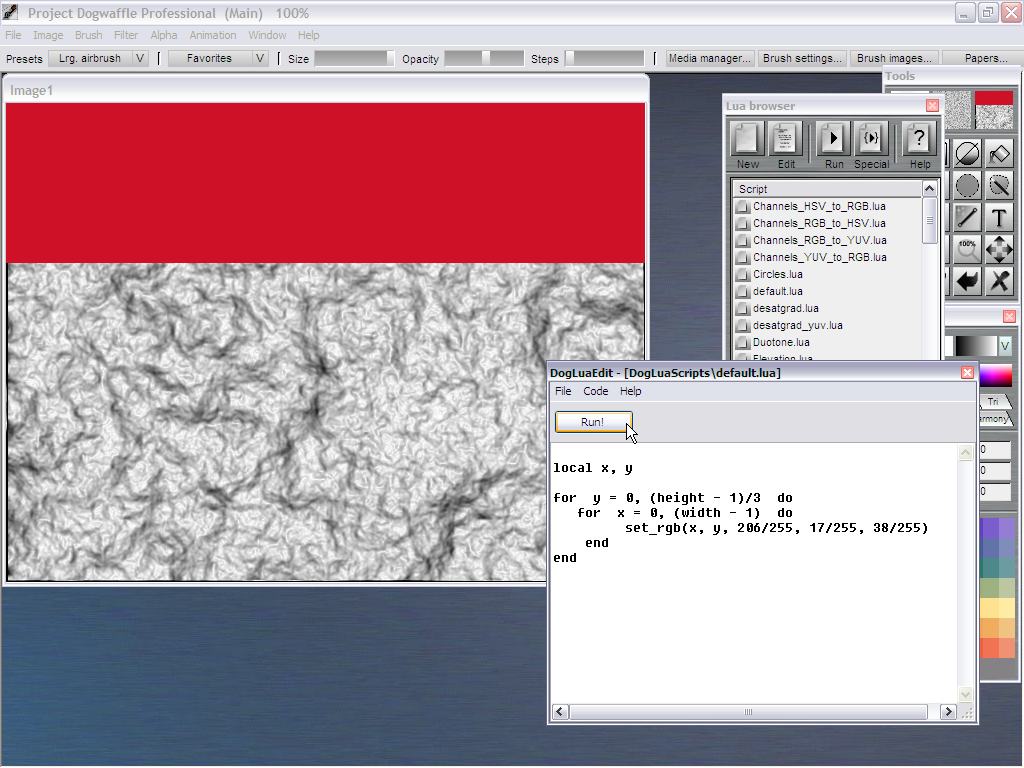 Likewise, we can add the bottom stripe, green, which has RGB values of R:58
G:119 B:40
and where the range is again for x from left to right across the whole width (that's the inner loop), and the vertical y values cover the other third from 2/3 to 1.0 times the height: for y = (height - 1)*2/3, (height - 1) do
for x = 0, (width -
1) do
set_rgb(x, y, 58/255, 119/255, 40/255) end end After adding this bottom green stripe and re-running the script, you'll see the top and the bottom color bands in place: 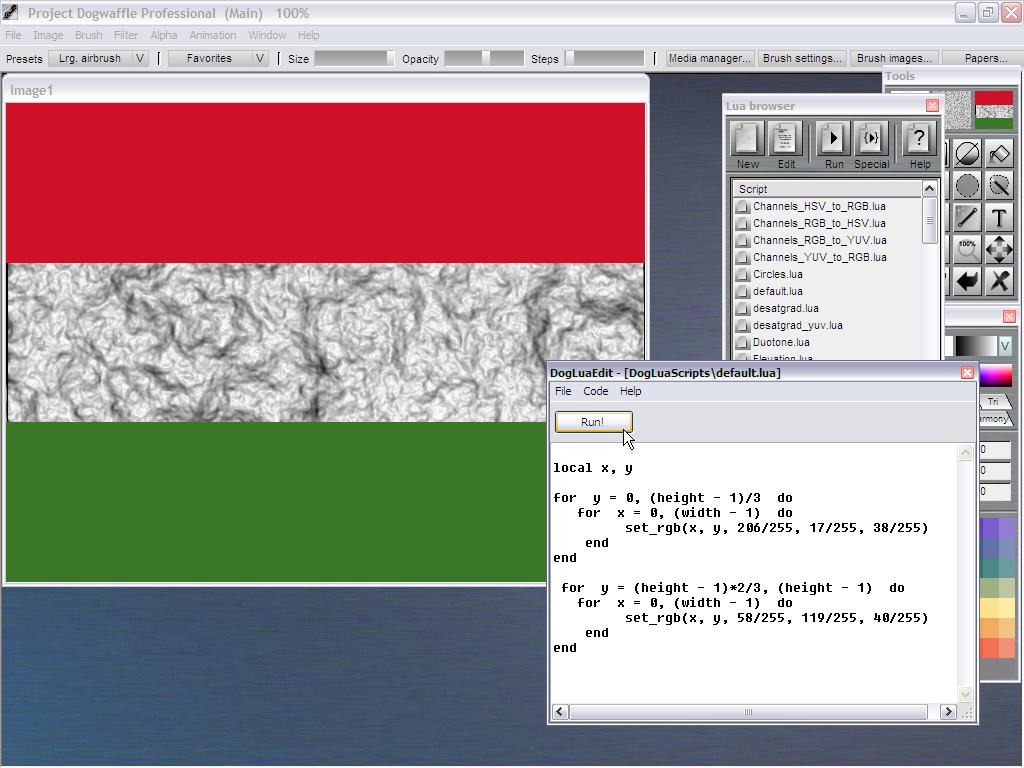 Now it's time to tackle the mid section. There are two white narrow bands and one blue band. Instead of creating this through a total of 3 bands, however, we'll simply do this in two steps: a large white band covering the whole mid section between red and green bands, and then a narrow blue band rendered over that. Of course, there are other ways to do this. I like this approach, because it mimics how I would paint it, first the white, then the smaller blue on top. White is of course FF in hexadecimal, 255 in decimal (for an 8-bit value per channel), and normalizes to 1.0. And if memory serves me right, everything internally in Lua is a floating point number so even if we pass 1 instead of 1.0 for the color we should be good. Here's the code for the mid-section white band, going from 1/3 to 2/3 of the height. for y = (height - 1)/3, (height - 1)*2/3 do
for x = 0, (width -
1) do
set_rgb(x, y, 1, 1, 1) end end And here's the next stage of rendered script: 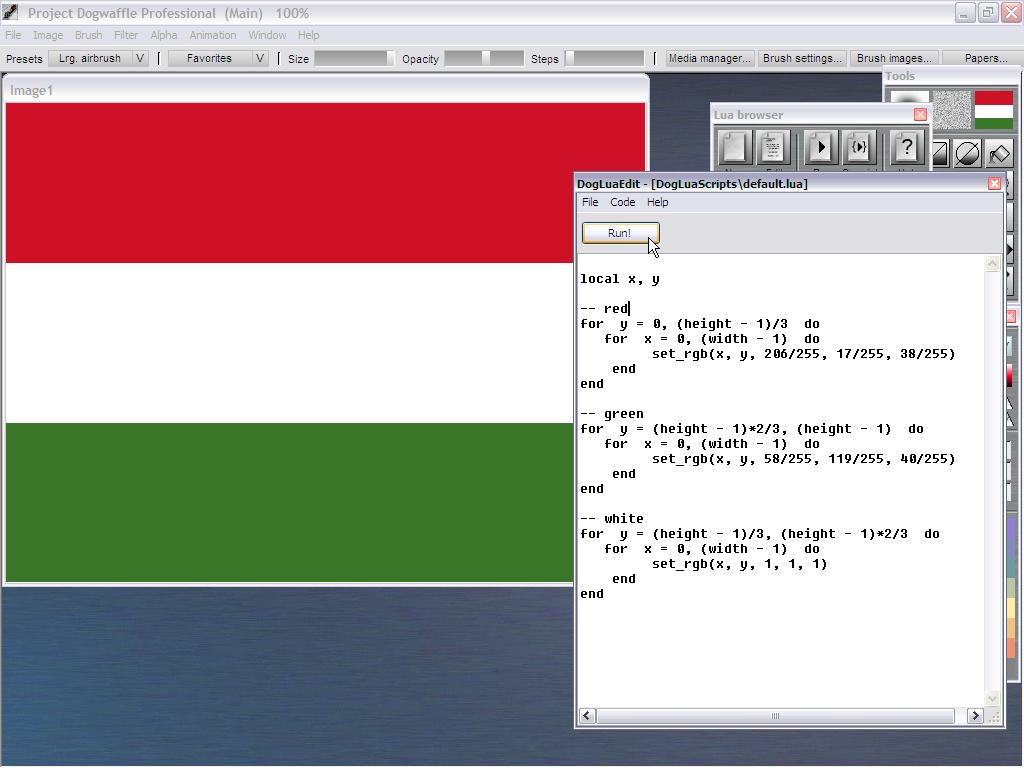 Note that the above code may not be strictly correct. We start the outer loop at y = one third of the height. That line of pixels was already se in the first loop, for the red band: it was the last row of pixels set to red by that loop. So, we'd be writing over that last red row, and perhaps we'd be better to start the loop at (height - 1)/3+1 Or we should have eded the loop for the red band at one pixel earlier, (height - 1)/3-1. That's almost a philosophical question though, especially if you have a large image buffer ith hundreds of pixels in height you're working on. The difference might be barely visible. Only if you render this on very small images, say 10 pixels tall, will this become a concern, as the relative impact of missing a row of color my a pixel makes a diffrence that's in whole percentages, possibly double-digits, and will be noticeably affecting the proportions. Then again, how do you split 10 rows of pixels into even 3 segments of the same size? Hoping I didn't confuse you too much here, let's now find the blue band's dimensions and its code for the middle part. If you load an existing map of Gambioa into Dogwaffle, you can try to match the dimensions against the rulers, or even with the Display settings, see how the proportions work for thr two thin white bands vs. the thicker blue section in the middle. For example, for a map that was resized to a height of 225 (3 x 75), I found that if I set he vertical visible grid to 15, it would fit 5 sub-bands into the white and blue area, confirming the rule of Gold I thought was at play here, namely that the white and blue were using 1/5 segments. That is 1/5 for the top white, then 3/5 for the middle blue, and another 1/5 for the bottom white. That being of course 1/5 of 1/3 of the whole flag's height. 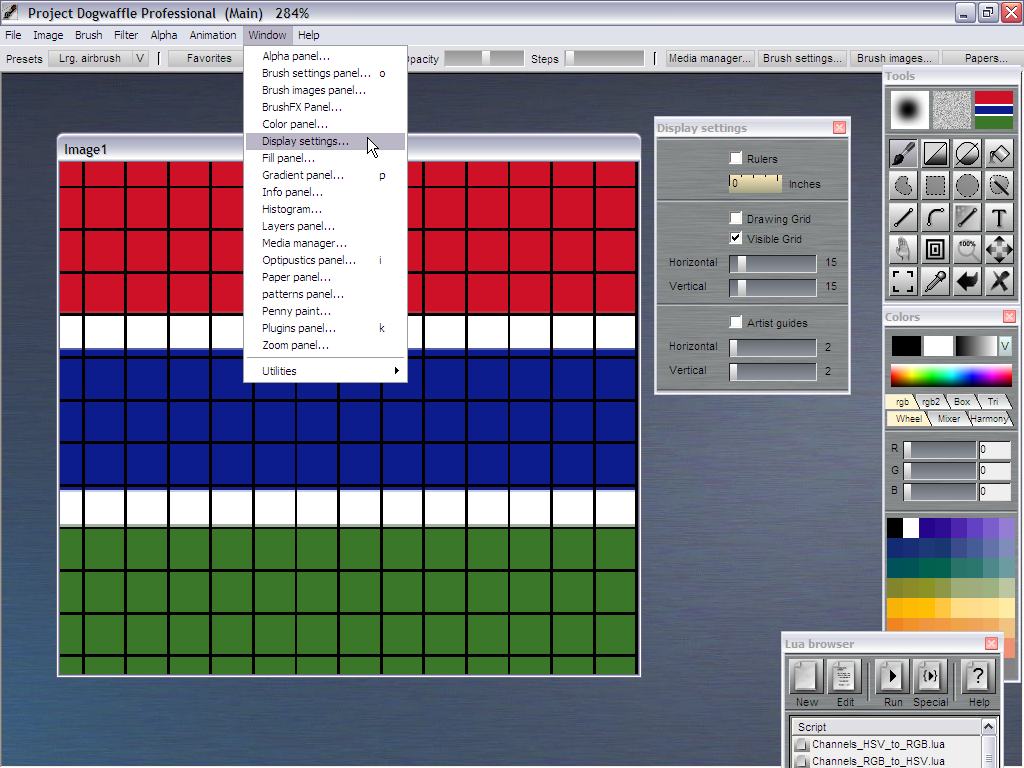 Thus, we can focus the blue segment to spread vertically from 1/3 plus 1/5 of 1/3,
which is the same as 1.2 times one third of the flag's height
to 1/3 plus 4/5 of 1/3 (or, working from the other end, 2/3 minus 1/5 of 1/3), which is the same as 1.8 times one third of the flag's height With the blue color consisting of R:12 G:28 B:140 for y = (height - 1)*1.2/3, (height - 1)*1.8/3 do
for x = 0, (width -
1) do
set_rgb(x, y, 12/255, 28/255, 140/255) end end And that's it, here's the complete script for the flag of The Gambia: local
x, y
-- red for y = 0, (height - 1)/3 do for x = 0, (width - 1) do set_rgb(x, y, 206/255, 17/255, 38/255) end end -- green for y = (height - 1)*2/3, (height - 1) do for x = 0, (width - 1) do set_rgb(x, y, 58/255, 119/255, 40/255) end end -- white for y = (height - 1)/3, (height - 1)*2/3 do for x = 0, (width - 1) do set_rgb(x, y, 1, 1, 1) end end -- blue for y = (height - 1)*1.2/3, (height - 1)*1.8/3 do for x = 0, (width - 1) do set_rgb(x, y, 12/255, 28/255, 140/255) end end 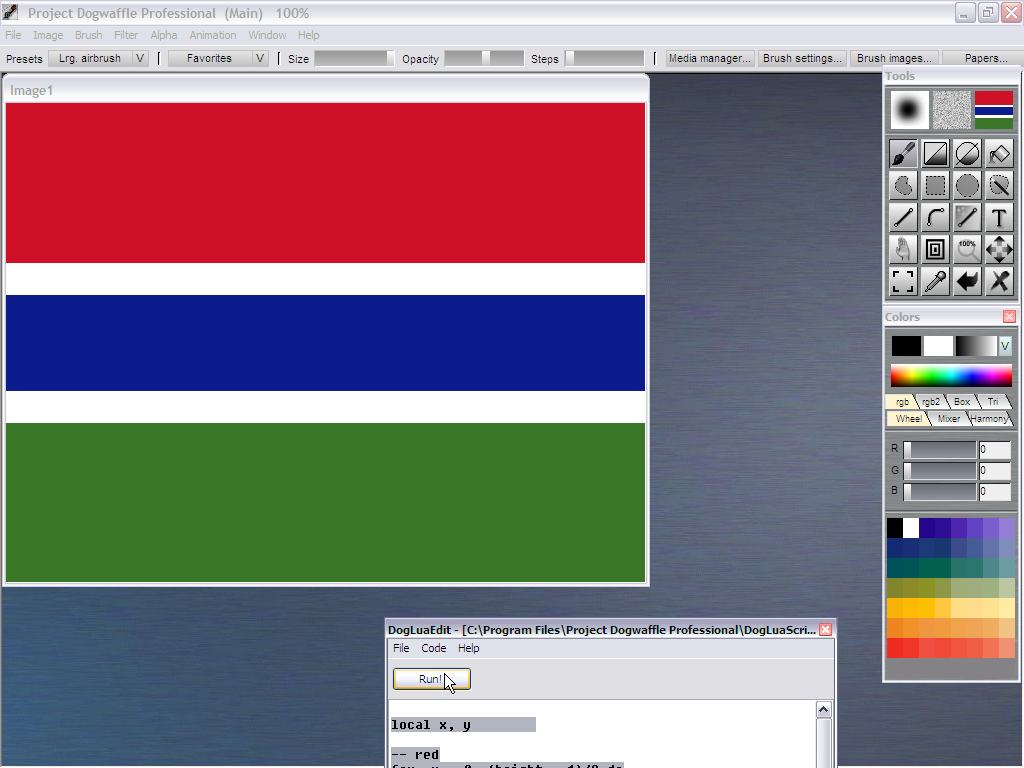 |
| Other
Lua Flags |
| Switzerland &
France |
more gluas
| More
gluas |
| gluas.org |
| DogLua |
|
|
|
|
|
|