Question:
Can I keep and
run multiple versions of Dogwaffle, such as PD Artist, PD
Particles, and PD Howler?
Answer:
Yes you can. However, you may
have to run them as Administrator, either on
occasion (when switching from one to another version) or
everytime, if you want to automate this. Read below for more
details.
What happens if you have installed a new
version and then try to run an old version from prior
installation?
When installing a new version, the installer
probably elevated the program to run as Administrator, which it
needs to do just once, so that it may properly register its
dependent components. When doing so, the same dependencies that
had been registered in the past with the old installation are no
longer associated with the prior installed version. Therefore, if
you try to run the old version(s), it is likely that it will fail
to launch, with this error: "Unexpected error; quitting"
For example, if you had previously been using PD Howler 9.6, perhaps the version
through Steam, and you have now just installed PD Particle 9, then trying
to run PD Howler would likely have this effect: You'd get the
error message: "Unexpected error; quitting"

This is because some of the components that had been registered
with the prior version (e.g. Howler 9.6) are no longer registered
with it, and instead have been registered with the newly installed
program. It's a separate copy of the same files, but that still
prevents them from being associated with the old installation. So,
the old prior installation can't be used at the moment, until you
re-run it as administrator, which will re-register its components
for proper execution.
Ok, so exactly How can I fix this?
When you initially installed the program, the
installer elevated and ran the program as Administrator, once,
just at the end of the installation. That's all it takes to make
it register its components and be ready to properly run. If this
was the only version of Dogwaffle installed, you wouldn't see any
problems. But now that you've installed another version, the old
version is left 'dangling' with missing components (or rather:
incomplete registration of components because the same components
from the new installation are now registered and associated with
the new version).
You can fix this: just run the previously installed version once
again as Administrator, at least just this once. Note that after
doing so,
this prior version can be relaunched again and again without
further need to be run as Administrator. But, the newer version(s)
that you just installed (prior to trying to run the old version)
are then no longer ready to run. It is now its turn to have
missing registered components. If you want to run such new
version again, you must in turn run it as Administrator, at least
once again, until to decide to switch back to another.
You can easily run the program as administrator from the right-click
menu.
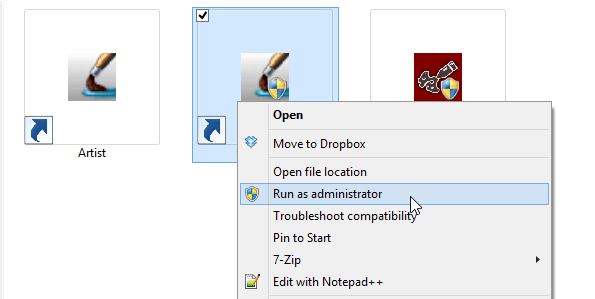
To run the program as Administrator, simply right-click
its launch icon and select: Run as administrator
Is there another, automatic way? I don't
want to right-click everytime I switch. I want to double-click
the icon or launch it from Start menus.
Yes, you can configure the program to run it as Administrator automatically.
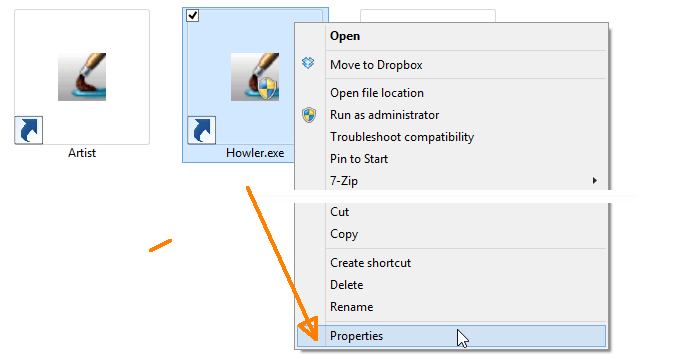
Simply right-click the file, and select Properties,
at the bottom of the menu:
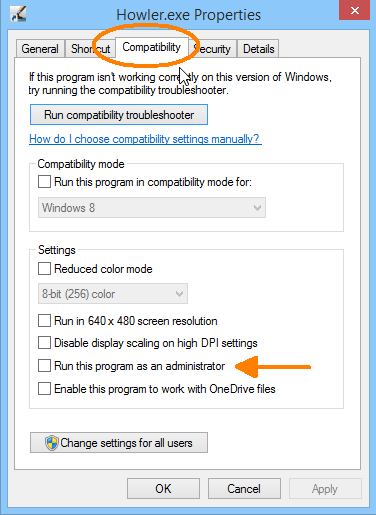
Then select the Compatibility Tab that shows various
compatibility options:
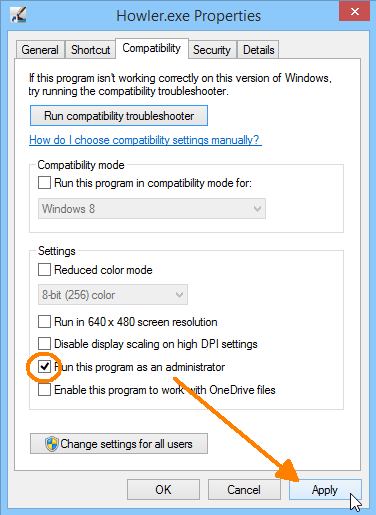
There should be an option to Run this program as
administrator. Select that option, then click Apply and/or
OK. The example below is from Windows 8.1, yours might be slightly
different.
That's it, you can now run
that older version of the program too, just by double-clicking
it. You will want to do the same trick with the newer and
other versions if you keep switching back and forth between
various editions such as PD
Artist (such as PD Artist version 9.6),
or an old PD Pro 4 or 5, or PD Howler
(including PD
Howler 9.6 found on Steam), PD Particles
(including Particle 9),
etc...
Obviously, the simplest thing is to only run one version,
namely the most recent version. But we understand that
sometimes you need time to adapt to new interface looks or
other changes. Or, you might have installed a demo version,
trying to determine if you want to upgrade. You still need
access to the prior, paid version, or even the freeware
versions. Also, you may have an old PD Pro 4 or 5 for
animation and video work, but may also have installed the new
PD Particle 9 for painting with new foliage brushes. There are
numerous situations and reasons why you may want to keep both
the old and newer versions around on your PC.
Note: When you run it, you will probably see a warning
popup from User Account Control, asking if you want to allow
this program to make modifications to the system?
These modifications pertain to updating the registry in order
to re-register the components that are needed by it.