The perfect marriage:
|
from
2D to 3D in just seconds!
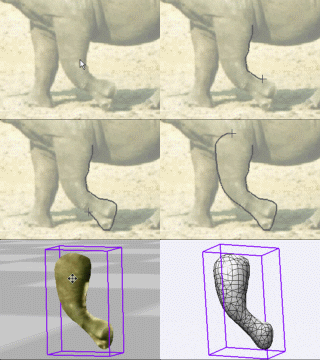
Just trace an
outline and see it automagically
turn into
fully textured 3D shapes for Second Life, Google Sketchup / Google
Earth, Direct X & Games, Wavefront OBJ and other popular 3D file
formats!
Archipelis
Designer
rapid
3D model creation and prototyping from mere images - for 3D content
creation, games, IM Avatars, SL models, 3D illustration in Photoshop(R)
and more
New!
now also for Mac!
|
|
Graphic Halftone 2
This new free add-on for PD (tested on PD Pro 4 but likely to work on a
few prior revisions too) will add some nice capabilities for
half-toning without loosing the colors of the original, i.e. it does
not convert to black-and-white, unlike a prior version of the Halftone
filter.
Note that this one was built with a new version of Visual Studio,
i.e. Visual Studio Express, and you may need an updated version of
the .NET framework, available for free by download from
Microsoft. Give it a try first without updating the .NET framework, and
if you notice error messages or problems,
then you'll want to update your system's .NET framework - read more
about it here.
This plugin was made for and tested on PD Pro 4. If you have an earlier
version, there's a reasonable chance that it may still work for that
too but we can't vouch for it. Use at your own risk.
As mentioned earlier, if you don't have an adequately recent version of
the .NET framework, you will probably see a message similar to
this:
Click the above image or here to
learn more about how to update your system's .NET framework.
There is no installer for this plugin (in this version), you simply add
the file into the
folder
where your PD Pro is already installed. At that point, the new plugin
will then become visible and usable to Dogwaffle through the Plugins
panel (remember: shortcut 'k' for killer plugins :-).... For
example, on most systems
this could be the folder named:
C:\Program Files\Project
Dogwaffle Professional
or similar places, depending on where you installed your version:
C:\Program Files\PD Pro
C:\Programs\project dogwaffle
C:\Programs Files(x86)\PD Artist
Here's the plugin, get it now:
Graphic_Halftone_2_pf.exe
(download and save
it
into the PD folder)
File details: (to check if you have the latest)
build date: Thursday, July 15, 2010, 1:43:16 PM
file size: 23.0 KB (23,552 bytes)
When downloading, we recommend that you don't open the file from the Link
in your web
browser directly. Instead, save it
to your local hard drive, such as to the
desktop or an easily found folder such as the 'My Documents' folder.
You can then copy or move it into the PD Pro installation folder,
which
is typically:
C:\Program Files\Project Dogwaffle Professional
by default - if that's where you installed yours, assuming PD Pro 4 full
installer was used. If you have PD Pro 3, or upgraded from PD Pro 3 to
4, yours might typically be in the PD Pro folder:
C:\Program Files\PD Pro
If you're on a 64-bit version of Windows, your folder might again be
different.
Remember: If you
had problems during installation of Project Dogwaffle
under Windows 7 or Vista, possibly because
of UAC (User Access Control),
perhaps you did the smart thing and decided to install PD Pro into your
own folder such as 'My Programs' instead of 'Program
Files' or 'Program Files (x86)' if on a 64-bit system.
Wherever your copy of Dogwaffle lives now, that's the folder
where you
will want to put the above plugin. It will then be amongst many other
similar executables, many of which are also plugins ending in
_pf.exe,
After placing the plugin in the right folder, you should start the
plugins panel and find the plugin in the 'Filters' tab
As usual, you can use the keyboard shortcut ''k" (short for killer
plugins :-) to open the plugins panel.
See the User's Guide
on this plugin for additional details
|
|
|