You
create an image, or load it from an image file, and now you want to fly
through it as if it was the wallpaper plastered on the inside of a
tunnel. It's as simple as that.
In the current version, the image needs to be a square shape, such as
512x512 pixels, 800x800, etc...
Simply start with the image, then use Create Animation, or if you
already have a blank animation of the desired frame count, load the
image into the first frame. Then use the tunnel plugin.
Launching the Plugin:
Simply run the plugin from the Plugins panle.
You will find tunnel_pf.exe inside the "Filter" tab. This one is an
animated filter, you must have an animation or at least a placeholder
for it in order to use the plugin. Only the first frame of the
animation is used, to then replace all frames with the animated tunnel
vision.
 ===> 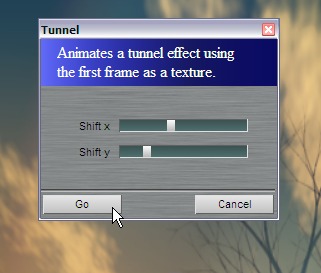
The Shft x and shift y values controls the transformation in
cylindrical mapping transformation. If you set one or the other to zero
(left most minimum), the motion is either straight linear without
rotation, or it is rotation in place without forward movement. Anything
in-between will reate a variety of great movements. Here are a few.
Tunnel 1 - used the Sky
render as a basis
Tunnel 2 - made loopable
thereafter
Tunnel 2 - changed
coloring, and added Embossing (in Timeline Editor)
Tunnel 3 - Shift X is
zero, only rotating, no flying in
Tunnel 4 - Shift Y is
zero, only flying into the tunnel, no rotation
Tunnel 4 loopable
Tunnel 5 - with post work
for darker center. Scary deep tunnel.
Fun things to Try:
After applying the tunnel effect once, apply it again. Or throw an edge
detection filter on it first, and emboss. Lots of fun things to explore.
If you have lots of RAM, you'll want to work with high resolution
images and resample to lower res when done for a little bit of
smoothing.
|
Want more? Learn more
about Pre-Ordering PD Pro 5
|
Get
the best discount now:
|
A Buck or two for a
Great Cause!
Please support us with a
small donation if you can
spare a little.
Can't purchase or upgrade yet? Still want to help
and
support the development of the next generation of PD Pro? If you'd like
to help out, we've set up this donation button which will send your
funds directly to Dan Ritchie, our star programmer.
Your
generous donation will also help
cover
the cost of hosting of free tutorials and maintaining the current
versions as
well as developing
future versions.
|
And now for
something completely different...
Have you tuned your Ukulele,
lately?

UkeTuTu.com
the Ukulele Tuning Tube |
Digital
Painting has never been
so much fun: Learn to
paint with Particle Brushes!

PD
Particles
A fun companion for your
digital
photo image editor!
powered
by Project
Dogwaffle
Can't
afford it on your own?
 |

|
|