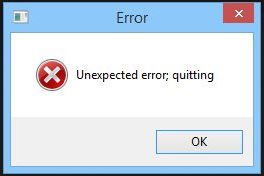
What's this
Error?
The long answer:
There re many reasons possible,
and if you do a Google Search for it, you'll find
more than one reference to it.
https://www.google.com/search?client=firefox-b-1-d&q=unexpected+error%3B+Quitting
However, what's the most common
reason for Howler, and how to fix it? Read
on...
The short fix:
The explanation is the
same as for PD Howler 9.6 or other programs
powered by Project Dogwaffle.
Find where PD Howler 10 is
installed in Steam, and fix this problem for
good
(1) Most likely, your
Steam installation on Windows lives in the
32-bit tree of Program Files on the C:
drive:
C:\Program
Files (x86)\Steam
(2) Inside
of the Steam folder, find the steamapps
sub-folder:

(3) Digging deeper, open
the common sub-folder:

Keep digging, we're not
there yet: You may have many games here,
we had just a few. We had uninstalled Howler 9.6
but the folder might still be there, albeit
empty.
(4) Howler 10 shows as a folder named
PD Howler 10 (note: although not
likely, it might slightly change over time for
future updates)

So here we are in the folder
of the PD Howler 10 installation under
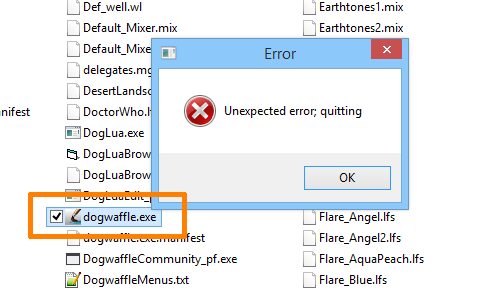
Steam. You'll want to look for the file
named dogwaffle.exe
(5) You'll need to scroll down to find it, most
likely, unless you have a high resolution screen
and a tall window on it.

(6) Did you
find it? This is the program file from which PD
Howler is launched: dogwaffle.exe
You can in fact try to run it from here, or create
a shortcut to your desktop for easy launch outside
of Steam too, if you want.

If we run it right now, it will
likely still fail with the "Unexpected error;
quitting" error, because we haven't run it as
Administrator yet.
(7) So, try right-clicking,
and
(8) use Run as Administrator.
You need to do this just once,
if prior or other versions of Dogwaffle had been
installed, or if the installer was not raised to
Administrator level. This is in order to
self-register a bunch of files for its use.

After you've done this once, it should launch
fine without the need to run as Administrator
again.
[ 8 ] Note
that if you still run Howler 9.6 or other versions
of Dogwaffle (such as PD Particles,
PD Artist,...)
you might have the problem again when switching
back and forth between those two or more different
installations.
Therefore, here's a better fix:
If you prefer to run this one as Administrator
every time automatically, use the Properties
option at the bottom of that right-click menu.
1. Select the Properties
view from the right-click context menu.
2. In the Properties
view, select the Compatibility tab
3. check the box for
'Run this program as an administrator'
4. click OK

From here on, whenever this
program is launched, it will re-register its
dependencies for its use. If you keep other
versions of Dogwaffle on the same system, you
may want to make that change for them too.
Happy howling! and
thanks for waffling.
Don't miss out!
What's new in recent versions of
Howler? 2019
(version 12) / 2020
version 13) / 2021
(version 14) ?
|