 |
|
|
|
|
|
|
 |

 Turn a spritesheet to an
animation to view it or work with it >>> Turn a spritesheet to an
animation to view it or work with it >>>
Introduction Project Dogwaffle is a perfect system for programmers and software develeopers who are interested in making their own products into plugins to Dogwaffle. Here you will find lugins which we occasionally add to the list of many already existing plugins included with the program. Note that there are also others, made available for free or for purchase, by third-party developers. >>> 3rd-party plugins. There are also filters in the form of Lua scripts, and as part of a set included with Doggybags. Look for doggybags in freebies or whatsnew General Installation Notes: In most cases there's no installer for these plugins. Unless there are other instructions specific to a particular plugin, you will want to simply download and extract the zipped plugin files and copy their content into the folder where you have installed Dogwaffle. In some cases, several files are included in a zip archive. In other cases, individual files are offered for direct downloading and copying to your dogwaffle installation folder. Using the Plugins Most of these plugins will be executable files (delivered compressed in a zip file). Their filenames will end usually in something like _pm.exe, _pf.exe, _pb.exe, etc... and thus be accessible through the plugins panel of Dogwaffle. You can access the Plugins panel through the 'Window' menu of Dogwaffle, or through the 'k' shortcut. remember: "k" stands for k)iller plugins Then select the appropriate tab (Brush, Misc, Filter, Import, Export,....) where you will find the newly installed plugin. Simply double-click it to run it. Warning: Keep in mind that some plugins were released a while back for Dogwaffle 1.6 or 2.1 or similar. In many cases, the plugins were later included with the new subsequent release of Dogwaffle. If you already have files of the same name, do not replace them with the ones from here, since perhaps you have a newer version of Dogwaffle that already includes the plugin? Read the details and the date info where available. When you are about to replace an existing file with a new one, Windows will generally ask you if you really want to replace the current file with the new one. It may also give you date information on the two files, so be sure to use that to make an informed decision. |
|
| Plugins: |
|
>>> TransformPlus - Enhanced Transform plugin NEW! (released March 8, 2009) |
|
| File: | TransformPlus_pf.exe
(size=73.0 KB (74,752 bytes)) - save this file in your Project Dogwaffle
Professional installation folder. For example, if
you use PD Pro 4, that would be by default: C:\Program Files\Project Dogwaffle Professional It will appear in the 'Filter' tab of the plugins panel (keyboard shortcut = 'k'), next to the already existing Transform_pf.exe plugin. IMPORTANT LIMITATIONS: This version does not work with PD Particles. It was made for PD Pro 4. It also works with PD Pro 3 and PD Artist (which is based on PD Pro 3.2 code) - It will fail with earlier versions - such as PD 2.1 or the freeware version 1.2 - as they don't have the necessary entry points in the drfilter.dll library (namely for the GoodTransform and FastTransform functions) and this the plugin will fail when you start to use it with these older versions. We recommend upgrading to PD Pro 3 or better. |
| Desc: |
This is an enhanced
Transform plugin, with the following changes:
Also note: if you're using PD Pro 4, the filter you run from the Filter menu directly (Filter>Transform>Transform) is a built-in version, not the external plugin file. Thus, you must run this enhanced TransformPlus filter from the plugins panel. Here's a screenshot of the new TransformPlus filter at work - enjoy! 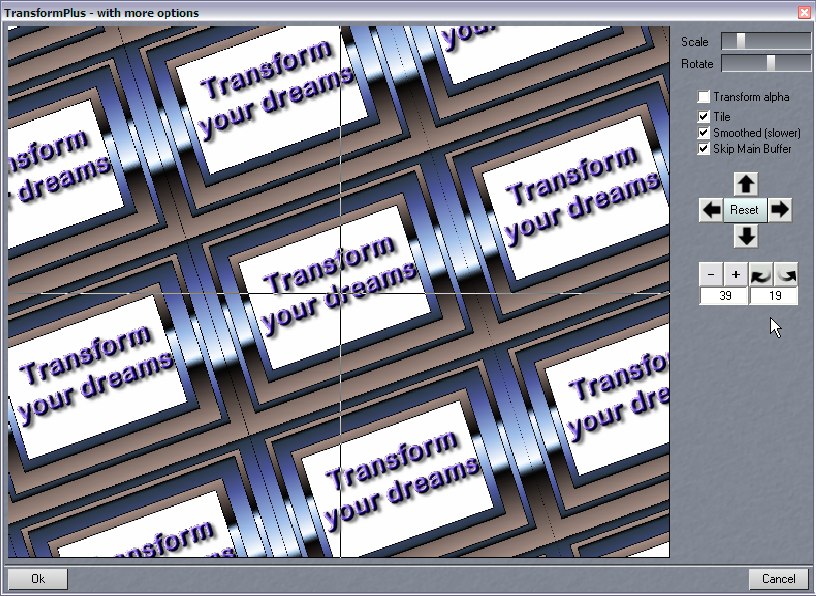 |
>>> Array to Animation NEW! (added Dec 28, 2008) convert an array of images to an animation |
|
| File: | ArrayToAnimation_pm.exe
-
save this file in your Dogwaffle installation folder. It
will appear in the 'Misc.' tab of the plugins panel. |
| Desc: |
It is similar to
ArrayToAnimatedBrush (in the 'Brush' category of the
plugins panel), but instead of loading the subimages into
an animated brush, it loads it into a new animation This can be useful for
animators who want to work on a full sheet with
several frames. For example, an array of 4 x 3 frames,
12 total. Or, perhaps a few missing rames at the end
(first 11 frames used in this screenshot example). You
can use the artist guides to visually show the frame
borders, draw the content of all frames, and the split
the array into a real frame sequence by way of a new
animation.
Click
here
for a tutorial >>> 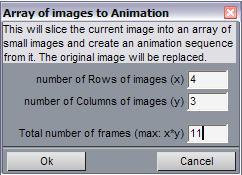 |
>>> AVI2AnimBrush NEW! (added Nov 25, 2008) Load an AVI file directly to animated brush |
|
| File: | 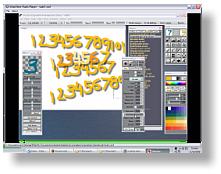 Avi2AnimBrush_v1.0_pb.exe
(size:
47 KB) - right-click and save the link as...; Made for PD
4, may also work also on PD Pro 3, PD Artist, PD 2 and
possibly even the freeware version 1.2. Happy
Thanksgiving, and thanks for waffling! Avi2AnimBrush_v1.0_pb.exe
(size:
47 KB) - right-click and save the link as...; Made for PD
4, may also work also on PD Pro 3, PD Artist, PD 2 and
possibly even the freeware version 1.2. Happy
Thanksgiving, and thanks for waffling!>>>>>>>>>>
Learn
more: see the tutorials!
|
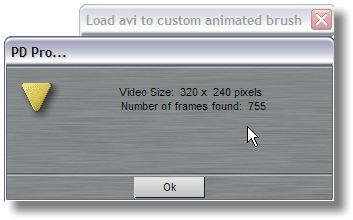
| Desc: | This is a great plugin for animators: load
your AVI clips directly into the custom brush as animated
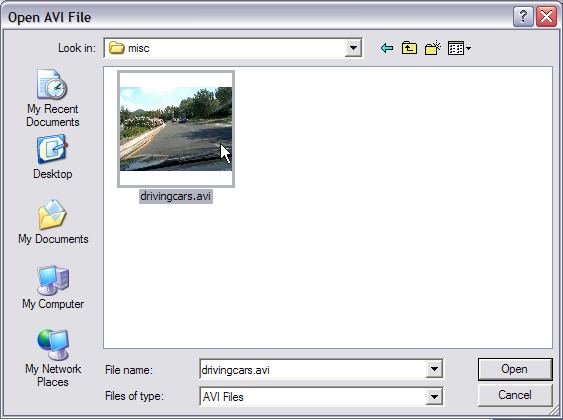
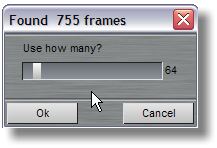
brush(!)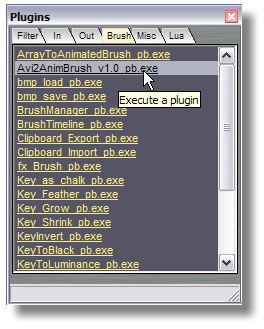 Save the above file into the folder where your PD Pro is installed (such as C:\Program Files\Project Dogwaffle Professional) After adding it to your installation, you will be able to see this new plugin in the Brush tab of the plugins panel. Usage:
   |
>>> Swap Color Channels: SwapRG, SwapBG and Swap RB NEW! (added Nov 23, 2008) |
|
| File: | 3 (Three) files to swap
color channels: (size 8 KB each) - right-click and save link as...; Made for PD Pro 3 & 4, works also on PD Artist, PD 2 and freeware version 1.2 |
| Desc: | 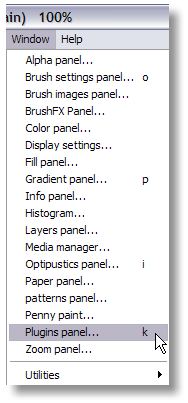 These free plugins are
useful for swapping the Red, Green and Blue channels: These free plugins are
useful for swapping the Red, Green and Blue channels:
Installation: download and place a copy of the files in the installation folder of your version of Dogwaffle, such as: C:\Program Files\PD Pro
C:\Program Files\project dogwaffle C:\Program Files\PD Artist C:\Program Files\Project Dogwaffle Professional After installation by copying into your Dogwaffle folder, you will be able to find the new filters in the filter plugin window under the Filter tab: 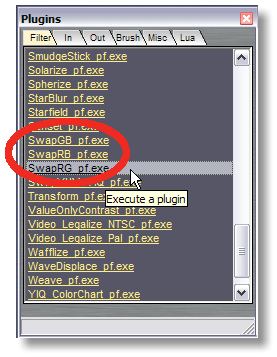 |
>>> Multi-Frame Spherize (added August 2, 2008) |
|
| File: | MultiFrameSpherize_pf.exe
(size = 59.5 KB) - right-click and save link as...; Made
for PD Pro 3 & 4, works also on PD Artist |
| Desc: | This free plugin is derived
from the Spherize plugin. It applies a spherize effect to
all frames of an animation. |
>>> Multi Transform (frame by frame) |
|
| File: |
MultiTransform_pf.exe
(size = 57.5 KB) - made for
and tested with PD Pro 4. May work with some of the other
versions too. |
| Desc: | The Multi-Trasform
(frame-by-frame) plugin is derived from the already
existing Transform Filter. It has a few additional
options, to allow doing transforms, frame by frame, across
each frame. This is to do something like manual image
stabilization if you have an image sequence such as of
photographcs snapped with a cell phone camera, without
tripod, and the hand wasn't pointing in exactly the same
direction each time. Installation and Use: This plugin is offered for free but there is no warranties whatsover, expressed or implied. Use at your own risk. To install, simply download the above file and save it directly into the folder where your Project Dogwaffle installation is located. If you're using Project Dogwaffle Professional 4, that would be C:\Program Files\Project Dogwaffle Professional. The plugin will be available in the Filter tab of the Plugins panel as usual. You should be using it with an animation. Also, the Alpha channel is NOT transformed by this plugin. If there's an alpha mask present, it may yield additional interesting effects. For example, if you are taking pictures from the same spot over time, in order to create a time-lapse animation, you might find that each picture is a little bit off from the ideal point of view. You might als have a slight tilt (rotation angle) that needs to be adjusted for some frames more than for others. 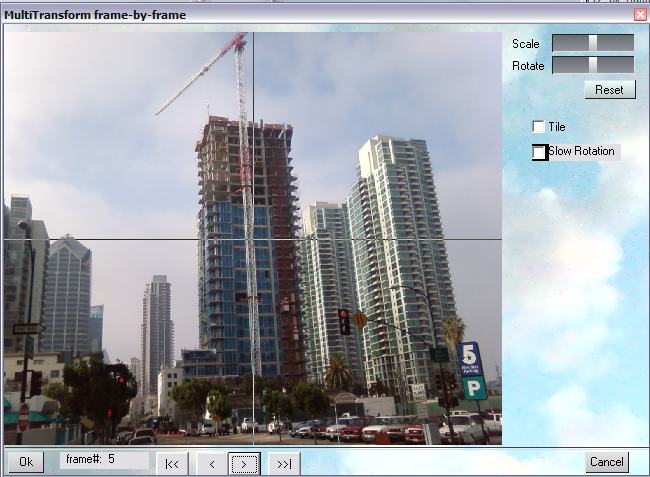 Additional buttons were added at the bottom-left which allow you to quickly navigate frame by frame across an animation and apply the desired transform on each frame. |
| Non-Uniform Scaling:
Scale Horizontally or Scale Vertically (added Dec. 26, 2007) |
|
| File: |
ScaleHorizontally_pf.exe |
| File: | ScaleVertically_pf.exe |
| Desc: | These plugins scale the
Main buffer's image, horizontally or vertically, relative
to the center of the image buffer. They also scale the
alpha channel. Installation: save the files into the folder where your PD Pro is installed. Next time you open the plugins panel, it will then include the two plugins in the Filter tab of the plugins panel. (not the Filters menu) Note: Originally made for and briefly tested with PD Pro 4.1 - should also work with PD 2.1, PD Pro 3.x, v5.x and v6 Howler) and the freeware v1.2. May also work with PD Artist. Will however not work with PD Particles. |
| Color
Key to Alpha
- added April 4, 2007 |
|
| File: Desc: |
ColorKeyAlpha_pm.zip
- 17 KB This plugin lets you select (make an alpha mask) from a particular color or hue which you pick, with tollerance. Add it to the folder where PD is installed. It will show up in the misc tab on the plugins panel. Made and tested for PD Pro 4, might work with earlier versions too, but no warranties |
| DWA_Viewer
- the DogWaffle Animation player
- updated Sept. 25, 2006 |
|
| File: Desc: |
DWA_Viewer_pm.zip - 10 KB this viewer has been renamed to contain _pm at the end so that it can be copied into the folder of your Dogwaffle installation and appear in the Misc tab of the plugins panel. It needs to be there anyway since it depends on the Penny.dll libraries. Alternate, Standalone version: DWA_Viewer_Standalone_Install.exe [size: 1.6 MB] - updated Sept. 26, 2006 This version does not depend on Project Dogwaffle or the Penny dll, so you can use it on a system without any Dogwaffle installation. This is an installer. Note for software developers: This tool is open source. DWA_Viewer_source.zip - 32 KB (includes also the Penny.dll runtime file) Feel free to customize and make your own. This is the rewritten source for the DWA(Dogwaffle
Animation) animation viewer. It reads the frames and
displays them directly from disk, without preloading the
whole clip. We're making the source public domain
(but not the actual viewer, since it relies on the
Penny dll). You can re-build it without the Penny
dll, in which case you'll have to find your own routine
for getting the pixels onscreen, or you can use the
slower 'Pset' method that is commented out in this
source code. If you don't need to display the
frames, and just want the load routines, you're all set.
It's written in VB5. Should compile in vb6 with no
problem. |
| ModDog - the Dogwaffle Mod
player (Music) more music
- making
music videos - video loops
|
|
| File: Desc: |
see here for details - first
version added Sept. 29, 2005, see details for latest
updates Remember the Amiga days? Ever played music files in .mod or .med format? This is a Mod player using the runtime library from MedSoundStudio - now you can be listening to your favorite mod music while waffling. And of course, with MedSoundStudio you can make your own music too! Give it a try with the Trial edition? |
| Video legalize |
|
| File: Desc: |
Video_Legalize.zip
- [7.93 KB (8,127 bytes), added Sept 2005 ] Video Legalize (gamut) filters for NTSC and Pal. |
| Plasma noise filters |
|
| File: Desc: |
Plasma.zip
- [7 KB (6,971 bytes) - added August
2005] Adds two new plasma types rendered in different color spaces (HSV, YUV) |
| Lua Browser |
|
| File: Desc: |
see new note below Browse and execute lua scripts, and apply them to animation. Lua (DogLua) itself is still a separate download. New! We now offer an updated download which contains several components all in one simple download:
|
| HAM screen mode filter in
Lua |
|
| File: Desc: |
HamGUI_lua.zip The Ham script simulates the HAM (Hold and Modify) screen mode. Install the .lua script and the bmp file in your DogLuaScripts folder. Place the three _pf.exe files (filter plugins for various 12-bit dithering modes) in the folder where Dogwaffle is installed, if you do not already have these files. It is assumed that DogLua and the GUI_Server application are already installed. |
| The GUI server (for
developers) |
|
| details coming here soon |
|
| Pre-Multiply for compositing |
|
| File: Desc: |
Premultiply_pm.zip [size:
4.13 KB (4,234 bytes)] Multiply the values in the buffer by the inverse of the alpha channel to prepare for compositing in applications that use pre-mulitplied images. added Sept.4, 2005 - intended for PD Pro 3.2, may work with earlier versions too. |
| Brush Transparency |
|
| File: Desc. |
Transparency_pb.zip
[size: 20.7 KB (21,255 bytes)] New tool for improved control of the brush transparency. Added Sept. 9, 2005. - intended for PD Pro 3.2, may work with earlier versions too. |
| Halftoning filter |
|
| File: Desc. |
halftone_pf.zip
[size:
4.13 KB (4,234 bytes)] a Half-toning filter. added June 2005, for PD Pro 3. |
| Sepia Filter |
|
| File: Desc. |
details about this filter are here |
| Make Wallpaper,
and other plugins - Doggybag
#4 |
|
| for PD Pro 3.2, may work
with earlier versions too - details here |
|
| Spherize, Doggybag #3 |
|
| for Dogwaffle 1.2 (freeware
version) - details
here |
|
| Doggybag #2 |
|
| for Dogwaffle 1.5/1.6 - details here |
|
| Doggybag #1 |
|
| for Dogwaffle 1.5/1.6 - details here |
|