
PD
Howler Media Brushes
How to install them into your Dogwaffle Media folder




| Some of the brush images are
distributed in Dogwaffle Media format. You will
typically have a Zip archive file that contains a
given number of media files. For each brush, there
are two files: one contains the image for
the brush, the other contains the parameters. To use these, you'll need a recent version of Dogwaffle, such as PD Howler 9, PD Artist 9, or PD Particle 9. Version 8 or prior might also work, but we didn't check. Use at your own risk. The zip archive contains 2 files for each brush: a .prv (preview) file and a .med (media) file. Extract the files into one of the Medias subfolders inside the folder where your Dogwaffle was installed. Or, create a new sub-folder for a new category, such as for stickers_batch7. We recommend that you create that subfolder in the Media browser, so that you can verify later that it was created in the right place. That's particularly useful if you have multiple installations of various editions or versions, and one from Steam. Click the Media Browser (1) button and create a new folder (2). You'll then see the newly created folder in the media browser.  After you've created the subfolder where you want to save the new media files, use Windows Explorer to locate it. For example, if you installed PD Howler in the default location under Windows 8, you'll find the installation folder to be: C:\Programs Files (x86)\Howler\ and in that folder you'll find a 'Medias' subfolder. Or if you installed Howler 9.6 under Steam:  Inside that Medias folder, you'll find a list of pre-existing subfolder for various categories, including the newly created one.  Put the new media files in there. Look for pre-existing subfolders in there. If you have PD Howler 9 you should find a category named 'Stickers' there. You can extract the new .med and .prv files directly into that subfolder, to join the others that are already in that category folder. Or if you prefer to keep the files from this batch separate from others, place them into their own new category subfolder. By default, extracting the archive may have produced a subfolder, such as one named 'Stickers_batch7'. You could simply move that folder into the Medias folder. After placing the new media files there: 
And now you're ready to use these new brushes: 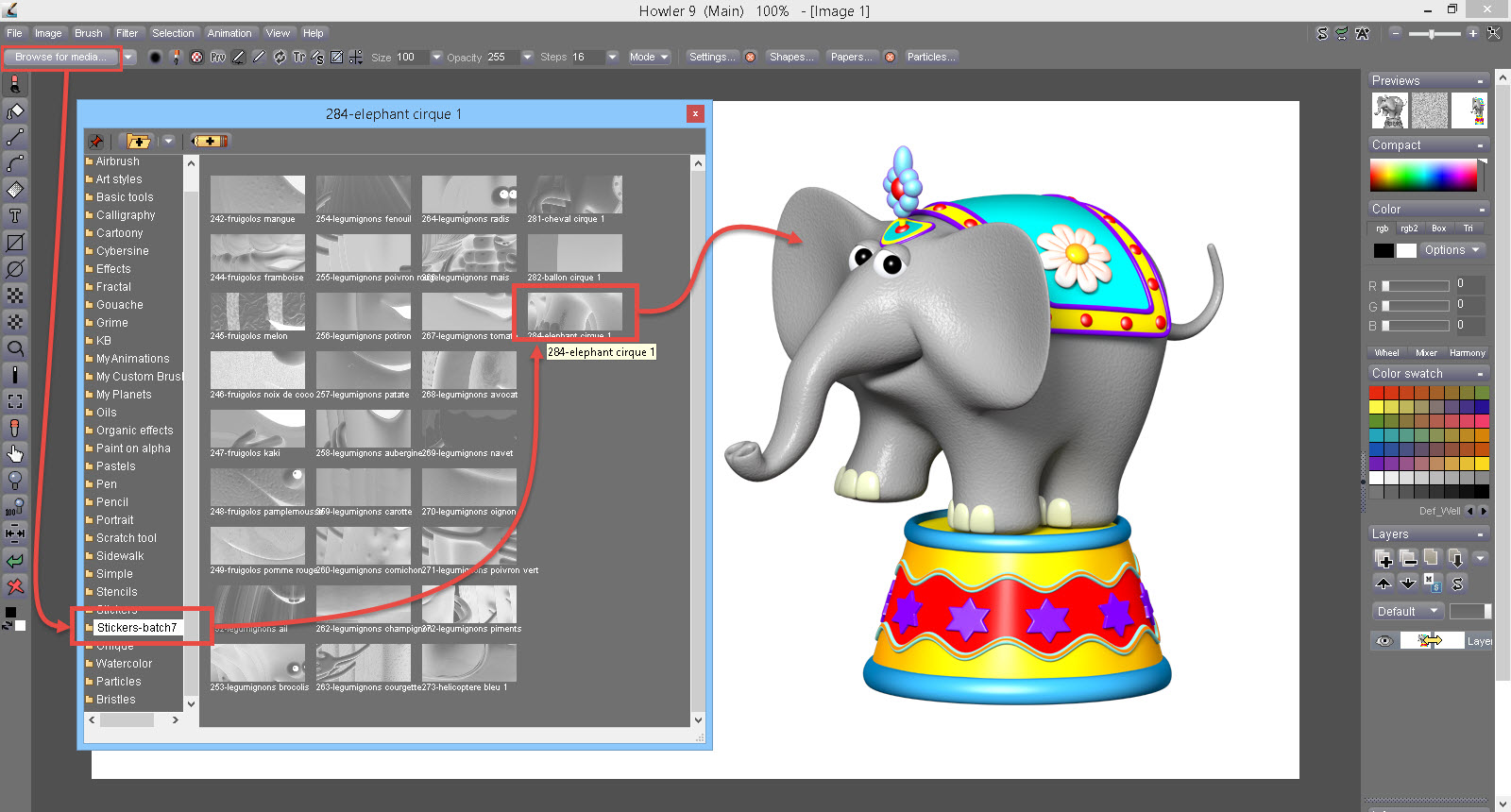 See more and all of them |
Buy PD Howler 9!
it's cheap enough, ok, I want it!

Buy Vinyl Stickers!
my kids deserve the best!
| Pre-requisite? |
You will need PD Howler 9 to use the animated brushes included in v9 or to build new ones, or to use new ones offered here for download on a regular basis. Some of the brushes will also be offered in standard PNG image format with transparency mask. You may not resell these in original form without the express consent from the author and copyright owner, Michel Agullo. |
| Michel Agullo? |
Learn more about the author, his 3D Stickers thebest3d.com/3dstickers  |