|


Hello,
We're continuing the promotion with free giveaway of Howler 8.2 in November and December 2014. You can read about v8 and subsequent release (v9, 9.1, 9.2, 9.5...) in our newsletters at http://www.thebest3d.com/dogwaffle/newsletter
PD Pro Howler v8.2 was first released on February 16, 2013. This release enables the use of the GPU (graphics processing unit, i.e. the graphics card or chip on your PC) for some of its plugins, when the system requirements are met. This release also works well on Windows 7 and 8, but still supports Windows XP and Vista as well, albeit without GPU acceleration. It's still very fast though, able to leverage the CPU's special features, going beyond MMX with GDI+, SSE2, multi-threading and more.
We do recommend that you use this with Windows 7 or Windows 8/8.1 - and with lots of RAM. (4 GB or more, when on a 64-bit system). Note that PD Howler is still a 32-bit application, but nevertheless, it helps to have more memory available than just what this program needs. You do a lot of other things on that PC at the same time, you know. And Dogwaffle's Howler may run some of its tools as separate programs, in their own address space, need its own amount of memory.
size: 24.4 MB (exactly 25,687,275 bytes)
Your unzip key to extract the installer: (check the promotional email or forum posts where you heard about this page's offer.)
Extract the installer from the zip archive, then run the installer. You should no longer need to run it as Administrator, but on rare occasions it may still be needed just once if the installer somehow failed to elevate the initial launch process to the admin level. Feel free to inform us if you run into that issue. In that case you should be able to remedy it by right-clicking the launch menu item (or the icon on the desktop), and selecting Run As Administrator. Again, it should only need this once, to register itself and create working sub-folders/temp folders.
To probe further:
Here are a few essential resources
to learn more about what you need to know.
Upgrade to PD Howler 9.2 or 9.5:
Your discount code for PD Howler v9.5 (at 51% off the regular price) is: CJVE0006E
Note: This code will expire sometime in January 2015.
Thanks again for using Project Dogwaffle, or, as we like to say, for waffling and howling. We hope you can tell your friends how much you like to paint, render and animate with PD Howler, and we look forward to reading your feedback and seeing your new artwork online, powered by Project Dogwaffle!
Team Dogwaffle:
Dan Ritchie - www.squirreldome.com
Philip Staiger - www.thebest3d.com
We're continuing the promotion with free giveaway of Howler 8.2 in November and December 2014. You can read about v8 and subsequent release (v9, 9.1, 9.2, 9.5...) in our newsletters at http://www.thebest3d.com/dogwaffle/newsletter
PD Pro Howler v8.2 was first released on February 16, 2013. This release enables the use of the GPU (graphics processing unit, i.e. the graphics card or chip on your PC) for some of its plugins, when the system requirements are met. This release also works well on Windows 7 and 8, but still supports Windows XP and Vista as well, albeit without GPU acceleration. It's still very fast though, able to leverage the CPU's special features, going beyond MMX with GDI+, SSE2, multi-threading and more.
We do recommend that you use this with Windows 7 or Windows 8/8.1 - and with lots of RAM. (4 GB or more, when on a 64-bit system). Note that PD Howler is still a 32-bit application, but nevertheless, it helps to have more memory available than just what this program needs. You do a lot of other things on that PC at the same time, you know. And Dogwaffle's Howler may run some of its tools as separate programs, in their own address space, need its own amount of memory.
Downloading and Installing:
Click the link below to download the zip archive that contains the installer:size: 24.4 MB (exactly 25,687,275 bytes)
Your unzip key to extract the installer: (check the promotional email or forum posts where you heard about this page's offer.)
Extract the installer from the zip archive, then run the installer. You should no longer need to run it as Administrator, but on rare occasions it may still be needed just once if the installer somehow failed to elevate the initial launch process to the admin level. Feel free to inform us if you run into that issue. In that case you should be able to remedy it by right-clicking the launch menu item (or the icon on the desktop), and selecting Run As Administrator. Again, it should only need this once, to register itself and create working sub-folders/temp folders.
To probe further:
Here are a few essential resources
to learn more about what you need to know.- Main page of Howler 8
- Howler Help
- Our YouTube channel - tutorials and sample videos to enjoy
- Free
Demos / Trials of other versions - the demozone
Interested in Upgrading to a newer Version?
When you're ready to move up to the latest, use this discount coupon. Place your order here: http://www.thebest3d.com/dogwaffle/salesUpgrade to PD Howler 9.2 or 9.5:
Your discount code for PD Howler v9.5 (at 51% off the regular price) is: CJVE0006E
Note: This code will expire sometime in January 2015.
Event better! order between November 24 and through December 1, Cyber Monday, and save 59% off the regular price. Use this coupon: FANTASY59
Note: Hurry - This code will expire on Tuesday, December 2, 2014.
Thanks again for using Project Dogwaffle, or, as we like to say, for waffling and howling. We hope you can tell your friends how much you like to paint, render and animate with PD Howler, and we look forward to reading your feedback and seeing your new artwork online, powered by Project Dogwaffle!
Team Dogwaffle:
Dan Ritchie - www.squirreldome.com
Philip Staiger - www.thebest3d.com
Interested in Learning more?
| Stay informed
of new tutorials and special promotions! Please join our newsletter |
V9.5 is here! new!
New Features
Purely Ballistic:
Howler 9.5

Slideshows:
Howler 9.5
Howler 9
Howler 8.2
Howler
| subscribe to our newsletter |
Notes about GPU &
System Requirements
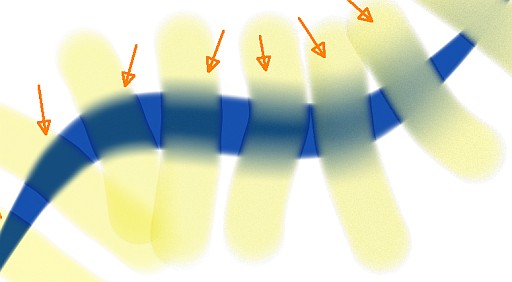
realistic water colors with pigment lifting
Foliage brushes

