Question:
How can
I
increase the number of undo levels? The slider in the
File>Prefs/Memory options panel only goes
to 96 MB, and if I work on a 2k x 2k imagewhich is 4 mega pixels, I can
only get about 5 or 6
levels of Undo. It seems like a 4 mega pixel image takes about 16
Mbytes of Ram when loaded into memory, which would make sense since
there's an 8-bit (1-byte) value for each red, green and blue, plus the
alpha, so in all 4 bytes per pixel.
Is there a way to increase the levels of undo so as to better work with
large images?
Answer:
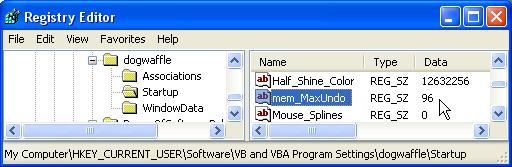
The memory is allocated when starting
Dogwaffle. The
amount to
allocate is kept in a registry, named
mem_maxUndo.
You can use regedit to edit
the system registry and modify the value stored
for this variable.
Warning: Do this
carefully. If you only have 256 MB RAM you probably don't want
to allocate much more memory than 96 MB anyway or it will go
virtual and start
swapping through the pagefile system on disk, which is much much slower
than if it all fits in RAM. But if you have for example 768 MB of Ram
or more, then you could possibly set the value to 200, 300 or even
higher. Some experimenting may be recommended. Memory allocation
is
not instantaneous. It may impact the flow and launch time of this
and other programs
too if too much has been allocated.
Here's how to try it:
- Quit Dogwaffle before changing the
registry entries.
- start regedit (e.g.: Startmenu > Run: regedit
)
- open
the
category named "HKEY_CURRENT_USER"
- open
the
subcategory named "Software"
- further
down
find and open the sub category "VB
and VBA Program
Settings"
There are 3
categories there.
- Look in
the 'Startup'
category: the "mem_MaxUndo" variable
is set to 96 if your slider was set to the max.
Select the
variable and use the Edit menu to
Modify it,
or right-click the variable to Modify it. Or double-click the variable
to modify it.
I don't
know
what to value recommend, it depends on your system's amount of Ram,
speed of Ram, speed of processor, .... If you have 1024 MB (1
GB) of RAM installed, perhaps try 400 for this?
I also don't
know if it has to have it in RAM or if it can
find it as virtual memory in the system's pagefile. Time to
experiment?
- Start Dogwaffle and see if it can hold more undos.
|

 Project
Dogwaffle & PD Pro:
Project
Dogwaffle & PD Pro: