|
Make 3D models from around
images & photos in seconds
Archipelis Designer
|
move up:
|
|
| intro - features new! - version info - samples - videos - download - Sales - Archipelis.com
- forums - FAQ - F.A.D. - Tutorials - What's New? new! |
|
PD Howler likes Archipelis
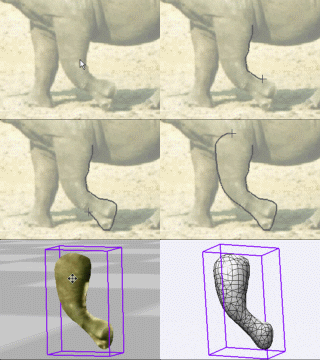
Just draw an outline
from a background image to make it a 3D with the same
image textured on it!
After that you can
change the polygon count, the texture, view it in
various styles, arrange the position and size, rotation
and shape of the created objects, save to 3D file
formats for further editing, and even view in 3D
stereoscopic (anaglyphic) mode - accelerated in 3D!
|
New Version!
Archipelis v4 - with Export to Dogwaffle!
- The Sea Gull -
Archipelis and PD Howler 9's
Puppy Ray
New
Video: Modeling a Bunny
- Reminder: Upgrade to
next version is free.
If you bought v2, get v3 now.
Buy v3 now to secure v4. Contact the developer for
details and delivery. If
you ordered the Cool Creative Bundle,
check with the developer.
- v3 is here!
learn more here
- Brand new powerful graphic
user interface
- Capability to 3D-print your 3D models
(integration with 3D-printing service)
- New export capabilities (Collada DAE and
HTML5 WebGL - see
example)
- Improvement of Second Life Scultped Prims
quality
- Second Life animation capability (Fred
Beckhusen scripts)
- latest
tutorials: 3dbirds: eagle head,
fishy-fishy, and teddy bear
- What is
Archipelis Designer?
Archipelis
Designer is a software that creates 3D
models in a different manner: it's
possible to create a 3D model
simply and
quickly by drawing it. Just draw the contour
of the various shapes of the model (for
example the head, the body, legs...) and
Archipelis automatically merges them and
applies a texture which comes from the image
you just traced. It is possible to use a
picture as a background and follows the
contours on it. Or you can use a blank view
and just draw the shapes you want from
scratch.
Thus, very simply and in just a few seconds or
minutes, it is possible to create
"photo-realistic" organic models and to export
them in widespread 3D formats like VRML, OBJ
and more. Then you can use your favorite tools
to add bones and rig the new creature for
professional animation. Or you can import it
to Quidam,
Carrara, TrueSpace,
Curvy-3D, Amapi &
Hexagon and other 3D tools for further
reshaping and editing the 3D mesh, and of
course you can also take it straight into a
game engine like 3impact.
September
2008:
The Archipelis company is pleased to announce
the availability of the version 2.0 of
Archipelis Designer.
Technology:
Archipelis
Designer takes a different approach to
creating 3D models by simply drawing its
shape! Just draw the contour of the various
shapes of the model (for example: the head,
the body, the legs) and Archipelis Designer
automatically merges them and applies
textures. It is also possible to use a picture
or photo as a background and follow the
contours on it.
Thus, very
simply and in about ten minutes, it is
possible to create realistic organic models
and to export them in widespread 3D
formats like VRML, 3DS Max, DirectX or Google
Sktechup and moreover Second Life. It's so
intuitive... This brand new version 2.0 is
much faster, more accurate, can work up to 6
txtures, can handle 3D interactions, can
export the result to the Second Life
platform... All that for 38 euros for Apple
Mac OS X and Windows.
Company:
Archipelis
is a young company located near Bordeaux,
Southern France. It started its activity in
the beginning of 2007 by providing
Archipelis Designer, a 3D tool for both
beginner and advanced 3D designers who wants
to create 3D content in a fast way. Now,
with the sucess of metaversed worlds,
Archipelis is entering and focusing on this
market with new applications.
|
|
|
|
|
|
Getting started with Digital
Art on a tight budget?

PD Artist
- only $19
Draw, Sketch, Animate & Paint
powered by Project
Dogwaffle
|
New v1.5
Fast
3D sketching, colormap, bumpmap and
displacement map painting and digital &
sculpting:
Curvy 3D
the fun & intuitive way to
sculpt!
...it's not modeling, it's better:
It's liberal
sculpting!
Great for Fantasy Art, Concept Art & 3D
Design, making 3D props, ...
Special discount coupons available for users
of Project Dogwaffle! (ask us)
|
|
February 2012 -
Archipelis v3
is here!
HOT! learn
more here
- Brand new powerful graphic
user interface
- Capability to 3D-print your 3D
models (integration with 3D-printing
service)
- New export capabilities (Collada
DAE and HTML5 WebGL - see
example)
- Improvement of Second Life Scultped
Prims quality
- Second Life animation capability
(Fred Beckhusen scripts)
See the User
Manual online
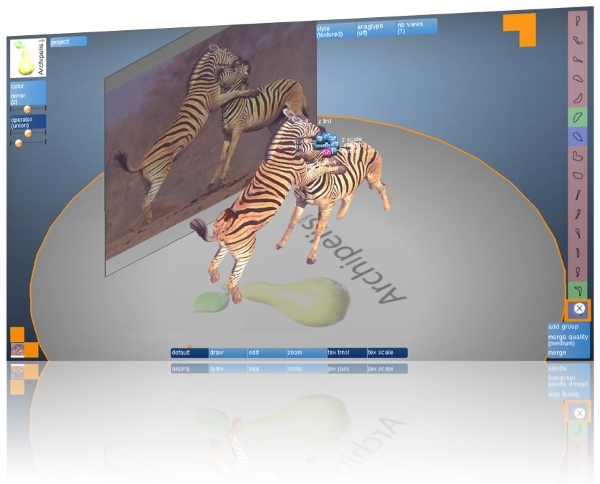
Tutorial: ZebraFight
September
2008
-
Archipelis 2 available for Windows
AND MacOS!
- now available Windows and also for MacOS
- SL (Second Life) exporter included
- new, powerful interface
- faster than earlier versions!
- See the new
User Manual
- order
here
Differences
between version 1.1 and version 2:
| Features |
V1.1 |
V2 |
| modeling
with images |
only
one |
up to
6 (cube face) |
| improved
accuracy |
no |
yes |
| improved
speed |
no |
yes |
| project
saving |
yes |
yes |
| export
into
various
formats |
yes |
yes |
| export
into
Second
Life |
no |
yes |
| integration
with SketchUp |
yes |
yes
(no for Mac) |
| 3D
interaction
when modeling |
no |
yes |
| shape
stretching |
yes |
yes |
| shape
Deformation |
no |
yes |
intersection/differences
between shapes |
yes |
yes |
| multiresolution |
yes |
yes
(automatically set when modeling) |
| region
of
interest
in the image |
yes
(for group) |
yes
with zoom |
| rendering
styles
of
the 3D model |
yes |
yes |
| texture
creation
and
modification |
yes |
yes |
| multi
views modeling |
no |
up to
4 |
anaglyphic
visualization
(red and blue glasses) |
yes |
yes |
New Pricing!
January
2008 - Announcing new,
lower price for Archipelis 1.1
Archipelis
Designer : 35 Euros
(about $46
USD)
Note:
pricing
may
change without notice, be sure
to check for current pricing
when going to the ordering
page
Announcing The
SL Exporter
January
2008 - Convert models from
Archipelis into Linden Lab's Second
Life, with the all new SL
Exporter for Archipelis!
Latest Version
& Releases
Version 2 is
out (sept. 2008) - now also for Mac
Plus: there is
also now a version for iPhone (without
texturing) and a fully featured version
for iPad!
Differences
between version 1.1 and version 2:
- New
user interface!
- Other
new features:
| Features |
V1.1 |
V2 |
| modeling
with images |
only
one |
up to
6 (cube face) |
| improved
accuracy |
no |
yes |
| improved
speed |
no |
yes |
| project
saving |
yes |
yes |
| export
into
various
formats |
yes |
yes |
| export
into
Second
Life |
no |
yes |
| integration
with SketchUp |
yes |
yes
(no for Mac) |
| 3D
interaction
when modeling |
no |
yes |
| shape
stretching |
yes |
yes |
| shape
Deformation |
no |
yes |
intersection/differences
between shapes |
yes |
yes |
| multiresolution |
yes |
yes
(automatically set when modeling) |
| region
of
interest
in the image |
yes
(for group) |
yes
with zoom |
| rendering
styles
of
the 3D model |
yes |
yes |
| texture
creation
and
modification |
yes |
yes |
| multi
views modeling |
no |
up to
4 |
anaglyphic
visualization
(red and blue glasses) |
yes |
yes |
New: SL export
included. Google Sketchup export included too!
What's New in v1.1?
- Free
update from 1.0 for current
customers
- Save
to several new formats:
- .obj
(Alias/Wavefront/Maya),
- .wrl
(VRML),
- .off
(OFF),
- .asc
(for
3DS
Max),
- .dxf
(DXF),
- .x
(Direct
X),
- .stl
(STL),
- .x3d
(X3D)
- Prossibility
to include models into Google SketchUp
- Also:
Automatic generation of program: C program
for rendering models based on OpenGL
|
|
See the new
User's
Guide
|
timelapse screen
capture of Archipelis Designer in action:
|
|
Archipelis
Designer - Features:
(Note:Specifications
subject
to
change and evolution)
- Save 3D models to SL
(Linden Lab's Second Life)
format\
- Trace 2D image
details to 3D
- Draw 2D shapes to
build 3D objects
- Viewing Modes:
Wireframe, Cartoon,
environment reflection
map, textured,...
- Control / change
surface decimation (adjust
polygon count)
- re-position &
re-shape the 3D objects
- Merge and Cut 3D
shapes that overlap
- Organize and
manage object parts into
groups
- drag-and-drop new
textures into scene, and
show them applied to the
3D objects in the scene so
far
- Stereoscopic view:
anaglyphic (red/blue) display mode with
dynamically controllable
angle, separation and
more!
- Save to 3D format:
.obj (wavefront), .wrl
(vrml),...
After
drawing and creating a 3D object, you can
save it to some popular 3D formats,
such as VRML and Wavefront OBJ. They
include the uv addresses for texture
mapping, and you can use the original
image from which you traced and created
the 3D shapes.
Here are some of the formats supported  (as
of version 2)
(as
of version 2)
- Maya Wavefront OBJ
- VRML 1
- VRML 2
- SL (Second Life)
- Google Sketchup
- STL
- DXF
- DirectX
Example:
after saving the rhino as OBJ file, we
loaded it into Carrara and placed
it with the texture in several instances
and at various orientations and sizes.
This took just a few minutes to create and
a few more minutes to render! We then did
some post work to add footprints in the
snow behind the baby rhino, and a few
snowfall filter fx and other special fx
(sunset red above horizon and fog grey
cold fx below horison) using Project
Dogwaffle.
|
|
|
For further editing and
morphing, reshaping and fine tuning: use Quidam, by
N-sided.
"I'm n-sided!..."

|
Archipelis
Designer: Videos
you can
use Archipelis Designer to draw
shapes traced against a background
image - but you don't have to. This
is also a very fun tool to use for
easy 3D modeling. If you can draw
blobby shapes, round shapes, any
shape - you can build 3D models!
|
|
|
|